User Icon

Clisto Free Course

"Embrace challenges; they nurture growth."

This course is 100% free and share this site with your friends!


Workshops Content

Workshop Image

Unlock Your Potential with Clisto.in Web Workshops.

Programming Course Content

Programming Course Image

Crack all coding courses and Create your own program.

Assessment Content

Assessment Image

Attend Assessment and Score up your skill.

Result Content

Result Image

Check your Assessments results here and keep learning more.

Clisto_Founder_Agni Image 2 Clisto_Founder_Agni Image 4

Explore Courses


Breakup Motivation - Tamil

How to handle life after breakup - tamil explanation

You have to handle things after your breakup.


Motivation


I wish you the great day to all my broke guys .


Decoding Scam Trading apps

Scam Trading App - tamil explanation

Before trading, just check your app or website to see if they are safe or not.


Business


This explanation & Practice helps you to save from scam trading apps.


Read

How to Identify and Avoid Scam Trading Apps


Examples of Secure Trading Apps:

For reliable stock market information and definitions, visit Investopedia.

Always prioritize security and research before using any trading app. By following these tips, you can avoid scam apps and protect your investments.


1. Research and Reviews:

2. Developer Information:

3. Security Features:

4. Regulatory Compliance:

5. Transaction Transparency:

Tips to Verify Legitimate Trading Apps:


How to buy a Bitcoin - Tamil Explaination

Bitcoin tamil explanation

Learn how to buy bitcoin with three steps .


Business


This explanation & Practice helps you to buy and sell bitcoin .


Read

Bitcoin Buying Apps

Popular Apps for Buying Bitcoin


How to Buy and Sell Bitcoin

Buying Bitcoin

  1. Choose a Cryptocurrency Exchange:
    • Research and select a reputable cryptocurrency exchange.
  2. Register and Verify Your Account:
    • Sign up for an account on the chosen exchange.
    • Complete the identity verification process.
  3. Deposit Funds:
    • Deposit fiat currency into your exchange account.
  4. Place an Order:
    • Navigate to the Bitcoin trading section.
    • Choose the amount of Bitcoin you want to buy.
    • Place a market or limit order.
  5. Store Your Bitcoin:
    • Transfer purchased Bitcoin to a secure wallet.

Selling Bitcoin

  1. Access Your Exchange Account:
    • Log in to your cryptocurrency exchange account.
  2. Navigate to the Sell Bitcoin Section:
    • Locate the option to sell or trade Bitcoin.
  3. Choose Your Selling Method:
    • Decide whether to sell for fiat currency or another cryptocurrency.
  4. Initiate the Sale:
    • Enter the amount of Bitcoin you wish to sell.
    • Confirm the transaction details and execute the sell order.
  5. Withdraw Your Funds:
    • Once sold, withdraw funds to your bank account or payment method.

NFT arts - Tamil Explaination

Selling NFT arts and start earning

Learn how to sell nft arts at online .


Business


This explanation & Practice helps you to sell NFTs and earn from it.


Read

  1. Register on OpenSea.io:
    • Go to the OpenSea website: OpenSea.io.
    • Click on the "Sign Up" button located at the top right corner of the page.
    • Fill in the required information such as username, email address, and password.
    • Complete the registration process by following the on-screen instructions.
  2. Install MetaMask:
    • If you haven't already, install the MetaMask browser extension for your preferred browser (Chrome, Firefox, or Brave).
    • Go to the MetaMask website: MetaMask.io.
    • Follow the instructions to install MetaMask for your browser.
    • Create a new MetaMask wallet or import an existing one if you already have one.
  3. Connect MetaMask to OpenSea:
    • Once you have MetaMask installed and set up, go back to the OpenSea website.
    • Click on your profile icon at the top right corner of the page.
    • Select "Profile" from the dropdown menu.
    • In your profile settings, click on "Connected Wallets".
    • Choose MetaMask from the list of available wallet options.
    • Follow the prompts to connect your MetaMask wallet to your OpenSea account.
  4. Add NFT Arts:
    • After connecting MetaMask, navigate to your profile on OpenSea.
    • Click on the "Create" button located at the top right corner of the page.
    • Select "My Collections" from the dropdown menu.
    • Click on the "Add New Item" button.
    • Fill in the required details for your NFT art, including title, description, images, and attributes.
    • Choose whether to sell the NFT as an auction or fixed price listing, set the price, and configure other sale settings.
    • Once you're satisfied with the details, click on the "Create" button to add your NFT art to OpenSea.


Chatgpt - Tamil Explaination

ChatGPT and Its Features in Tamil

Learn how to utilize ChatGPT effectively and explore its various features.


Education


This explanation & Practice helps you to know about the function of chatgpt & prompting


Read

Chat GPT App

To login and use ChatGPT, follow these steps:

  1. Download the App: Go to your device's app store and download the ChatGPT app.
  2. Create an Account: Open the app and create an account if you don't have one already. You might need to provide an email address and create a password.
  3. Login: Once your account is created, login using your email address and password.
  4. Start Chatting: Once logged in, you'll be taken to the chat interface. Simply start typing your messages, and ChatGPT will respond.
  5. Customize Settings: Explore the app settings to customize your chat experience, such as changing the language model, adjusting preferences, or enabling/disabling certain features.
  6. Use Commands: ChatGPT supports various commands to perform actions or access specific features. Type "/help" to see a list of available commands.
  7. Enjoy Conversations: Engage in conversations, ask questions, seek advice, or just have fun chatting with ChatGPT!
  8. Feedback: Provide feedback within the app to help improve the ChatGPT experience.

Remember to adhere to the app's terms of service and community guidelines while using ChatGPT.


To login and use ChatGPT on the website, follow these steps:

  1. Navigate to the Website: Open your web browser and go to the ChatGPT website.
  2. Sign Up or Login: If you already have an account, click on the "Login" button and enter your email address and password. If you're new, click on "Sign Up" to create an account by providing your email address and creating a password.
  3. Verification (if required): Depending on the website's policies, you may need to verify your email address by clicking on a link sent to your email inbox.
  4. Access Chat Interface: Once logged in, you'll be directed to the chat interface. Here, you can start typing your messages to interact with ChatGPT.
  5. Explore Features: Take some time to explore the features available on the website. You might find options to customize your chat experience, access settings, or learn about additional functionalities.
  6. Use Commands (if available): Similar to the app, the website version of ChatGPT may support commands for performing specific actions or accessing features. Look for a help section or type "/help" to see a list of available commands.
  7. Engage in Conversations: Start chatting with ChatGPT! You can ask questions, seek information, or simply engage in casual conversation.
  8. Provide Feedback: If there's an option to provide feedback on the website, consider sharing your thoughts to help improve the ChatGPT experience for yourself and others.

Remember to adhere to the website's terms of service and community guidelines while using ChatGPT.


Prompting - Tamil Explaination

What is prompting in Tamil

Learn how to utilize ChatGPT effectively and explore its various features.


Education


This explanation & Practice helps you to know about the function of chatgpt & prompting


Read


#3 Practices for prompting

Creating a simple Responsive Website with Transition Effect using html, css and js

Step 1

Step 2

After copying prompt go to chatgpt website


Step 3

Paste your copied code at this link to run a output


JS Fiddle - Run a code here (Click to open in a new tab)


Note:

This is a simple prompt to guide website creation.


1. Showcase your work, projects, and skills in html.

2. Share your thoughts, experiences, or expertise on various topics in html.

3. Create an online store to sell products or services in html.

4. Build a website for a company or organization to provide information about their products, services, and contact details in html.

5. Design a website to showcase your professional experience, skills, and qualifications in html.

6. Create a website for an upcoming event, such as a conference, workshop, or concert, with details about the schedule, speakers, and registration in html.

7. Develop a platform for online courses, tutorials, or educational resources in html.

8. Specifically tailored for designers, artists, photographers, or other creative professionals to showcase their work in html.

9. Design a small-scale social networking platform for connecting users based on common interests or activities in html.

10. Develop a web-based tool or application that provides specific functionality or solves a particular problem in html.

These prompts can serve as starting points for your website project, and you can customize them further based on your interests, skills, and goals.


Start from here

Image Description

This world and our lives are fully blended with pain and happiness. Life is a journey filled with ups and downs, challenges and victories, sorrows and joys. It's a complex tapestry of experiences that shape who we are and how we perceive the world around us.

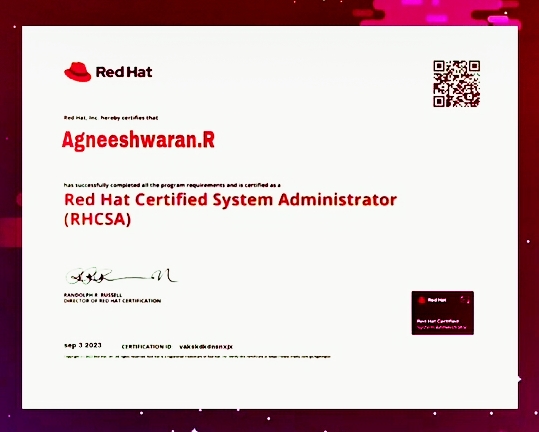
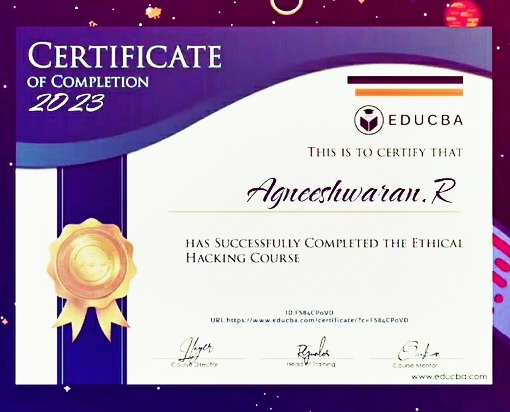
My Achievements

Certificate Image 1

Certified in Red Hat

Certificate Image 2

Certified in Educba

My Short Bio


I made an Own Image Search AI chatbot and working as Web Game Dev. I am an entrepreneur, web technology trainer, motivational speaker, and the proud founder of the Clisto website. My journey began at the age of 13 when I embarked on my career in computing and hardware assembly. Over the years, I have honed my skills as a website freelancer, specializing in UI/UX and Full Stack Development. Passionate about technology and inspired by countless science fiction novels, I have immersed myself in the world of innovation and creativity. Looking ahead, I aspire to not only excel in my current ventures but also pursue my dream of becoming an actor, igniting hearts and minds with my performances.

Pain of Individual


In this society, successful mindset individuals often face unique pressures and expectations. They are expected to excel in every aspect of life, to constantly strive for more, and to maintain a facade of unwavering confidence and success. However, the reality is that even the strongest among us have moments of doubt, vulnerability, and struggle.

Pressure of Society

Society's relentless pursuit of perfection can weigh heavily on the shoulders of those who dare to dream big and pursue their passions. Despite these challenges, successful mindset individuals persevere, drawing strength from their experiences, learning from setbacks, and embracing the journey towards their goals with resilience and determination.

Now How can we overcome this and lead our dream life

Embrace the journey ahead with unwavering optimism. Let me guide you towards a path of positivity, infusing you with boundless energy through the power of knowledge. Together, we'll embark on a transformative experience, exploring the intricacies of life through meaningful games that enlighten and empower. Open your mind, listen intently, and engage wholeheartedly. Witness the profound impact of your growth and evolution, igniting a spark within you to embrace change and seize every opportunity that comes your way.